

You don’t need years of experience to understand why ranking on the first page matters. When was the last time you clicked through to the second page of Google results? Most people never do. That’s why learning solid SEO basics matters if you’re just starting out.Therefore, knowing the best SEO tips for beginners is crucial in this situation.
Search engine optimization, or SEO, is the practice of improving your site so it ranks higher on search engine results pages. The process technically applies to any search engine, but since Google handles the vast majority of searches, most people just call it “getting to the top of Google.”
In practice, SEO comes down to this: you create content built around the right keywords, and that content pulls in visitors who are actually looking for what you offer.
The methods have changed a lot. Early SEO meant picking relevant keywords and using them across your site. Search engines now weigh far more than keywords. They look at your site’s authority, how well your content is written, and whether it actually answers the reader’s question. Any current SEO advice has to account for all of that, not just keyword placement.
SEO stands for Search Engine Optimization.
It is the process of optimizing your website to make search engines such as Google understand your content and show it to the people looking for information.
Imagine you’ve written a really cool article on earning money online. If Google does not understand what your page is about, it probably will not be shown in the search results. This is where SEO comes in.
Instead of promoting yourself via social media or investing in ads, SEO allows people to find your content naturally in Google search.
Let’s say a person types in:
• “How to start a blog”
• “Best SEO tips for beginners”
• “How to make money online”Unlike paid advertising, SEO keeps working even after you publish your content. A well-optimized article can continue attracting readers months or even years later. That’s why many successful websites treat SEO as a long-term investment rather than a quick marketing tactic.
Why Is SEO Important?
Many beginners think SEO is only useful for large companies. That’s simply not true.
Whether you own a personal blog, an affiliate website, an online store, or a local business website, SEO helps people discover your content. Here are some of the biggest benefits:
| Benefit | Why It Matters |
|---|---|
| Free organic traffic | Visitors come without paying for ads |
| Long-term growth | One article can bring traffic for years |
| More trust | Users often trust organic results more than ads |
| Better user experience | SEO encourages clear, helpful content |
| Higher conversions | Targeted visitors are more likely to take action |
How Does Google Rank Websites?

The common false belief of the newbies is that Google reads each and every new post and ranks it. Actually, there are three different steps through which the process occurs.
1. Crawling
Google uses computer programs known as “crawlers” (or “bots”) to find new pages on the Web. These bots crawl from page to page, looking for more new content. Google could take longer to find your page if there are no links to it.
2. Indexing
After Google locates your page, it attempts to comprehend the page. It looks at your title, your headings, your pictures, the words in your text, your inner links, your key words and the entire subject. If it all feels like it has something useful to offer, Google indexes your page in its search index which is sort of like Google’s enormous digital library.
3. Ranking
Each time someone searches Google, its software algorithms match thousands, if not millions, of pages to determine which get placed at the top of the results. Google takes hundreds of factorsinto account when determining the ranking of a website, but some of the more significant factors are:
The helpfulness and quality of the content.
• Search intent alignment
The speed of a page and its ability to work well on mobile devices.
• Internal linking structure
A solid understanding of website authority and user experience
The pages with the best overall experience tend to have higher ranks. This is why keyword stuffing is no longer a viable strategy; Google’s aim is to provide the searcher with what they want rather than pages stuffed with keywords.
18 SEO Tips for Beginners
Tip 1: Start With a Keyword
A big error that many people make is choosing what they want to write about without determining if there is an interest in such content. You can get a better idea of what your audience is looking for by doing keyword research.
Here are some questions to ask before writing an article:
- What is my reader looking to accomplish?
- What would they search for on Google?
- Are there sufficient numbers of searches?
A costly set of tools is not required. You can use Google Search Console, Google Trends, and Google Keyword Planner, among many others, to find useful keyword ideas. These are all free.
For each page, pick one keyword and then use related words throughout the text. It’s not about repeating the keyword over and over. It’s about providing the information and discussing the subject as much as possible, so Google understands your page.
Tip 2: Understand the Search Intent
Selecting the right keyword is just the first part of the task. It’s also important to know the reason someone looked for it. This is referred to as search intent.
If a person searches “buy laptop,” for instance, they want to buy something. Someone searching “how to choose a laptop” wants advice. The two searches need very different content.
When writing your article, first conduct a search for your keyword on Google and see what the top-ranking articles look like. Are they tutorials? Product reviews? Lists? Videos? Google is already telling you what users expect. Producing content that matches that expectation greatly improves your ranking chances.
Tip 3: Write for People First
In the past, some sites have been ranked based on putting keywords in everything in their paragraphs. That’s the approach that is not always the right one nowadays.
Don’t ask yourself the question, “How can I impress Google’s algorithm?” but rather, “How can I really help someone out with their problem?
Write as if you are communicating with a friend. Use simple language. Stay with short paragraphs. Avoid unnecessary jargon. Your article should be easily understood by a beginner. Surprisingly, creating content for people is the best method for optimizing for search engines.
Tip 4: Focus on Quality Content
Google does not give a blessing for length. It rewards content that’s useful. An article that is of high quality should:
Respond to the reader’s question thoroughly
- • Include accurate and up-to-date information
- Be easy to read and navigate
- Provide practical tips and examples
Rather than writing five articles per week that are average, write only one article per week that is outstanding, and have readers bookmark it and share it! In the long term, quality is always better than quantity.
Tip 5: Use Your Keywords Naturally
After selecting your main keyword, use it wisely, but not too much. It’s a great idea to put it in your:
The headline and opening sentence.The headline and opening sentence.
This will be a single or double heading.
• Meta description
The alternative text for the images (if applicable)
• Conclusion
Don’t repeat the exact same words in each paragraph. Rather, employ related words and natural language. This can help Google identify what your topic is without it appearing redundant in your writing.
Tip 6: Put Keywords in the Title Tag
A visitor’s first impression of you will likely be your title. If your article is ranking well, but your title is not, it can lead to less traffic.
A good title should describe the topic, align with the search query, feature your main keyword, and offer a certain advantage. For example:
• Weak: “SEO Guide”
Miss 25 Best SEO Tips for Beginners to Rank Higher on Google.
The second book clearly communicates to readers what they will learn and why they should click through.
Tip 7: Use Headings to Make Reading Easier
Most people scan pages, rather than read every word. Your text may be too large, which can make it overwhelming and cause your visitors to leave before they have found the information they need.
Use headings and subheadings to structure your text. Good headings keep readers on the page, focused on reading the right information and provide them with a quick way to navigate the page. They also are used to make Google “understand” the structure of your content.
Tip 8: Optimize Your URLs

Your website URL makes it easy for users to understand what your content is about and aids in helping search engines to crawl your site. A good URL will be briefer, be descriptive and be natural in the inclusion of your main keyword.
• Avoid: yourwebsite.com/post-123?id=456
• Avoid: yourwebsite.com/everything-you-need-to-know-about-seo-if-you-are-a-complete-beginner
• Use: yourwebsite.com/seo-tips-for-beginners
Do not include dates unless it is necessary and do not use filler words. Also for WordPress sites, set the permalink before you click Publish as it’s easier to do it before Google indexes the page.
Tip 9: Optimize Your Images
Photos do more than make your content more interesting—they are also an important part of SEO. Many new site owners upload large images without considering the impact it will have on the website’s loading time.
When preparing an image for upload:
Compact and shrink it to fit into a smaller file.
Rename the file to a meaningful name (seo-tips-checklist.webp)
• Place descriptive alternative text where needed, and include it in a natural way in the surrounding text
If possible, select modern formats such as WebP.
The purpose of alt text is to help make the image accessible, not for SEO. Don’t overstuff keywords into all the image descriptions.
Tip 10: Make Sure Your Website Is Mobile Friendly
Over half of the traffic to the web is now mobile. Go to your own website from your phone and ask yourself “is the text easy to read? Can the buttons be pressed? Are images displayed on the screen?
When they have to zoom in, scroll sideways or wait too long for a page to load, they will likely leave. These signals are noticed by Google as they impact user experience. Most of the WordPress themes that are available these days are responsive, but when it comes to new articles, always check before you publish.
Tip 11: Improve Your Website Speed
Nobody likes waiting for a slow website. Many visitors won’t wait more than a few seconds for a page to load before leaving. Here are some simple ways to speed up your site:
| Improvement | Why It Helps |
|---|---|
| Compress images | Reduces page size |
| Install a caching plugin | Saves load time for repeat visitors |
| Choose reliable hosting | Improves overall performance |
| Remove unnecessary plugins | Prevents slowdowns |
| Enable lazy loading | Delays loading images until needed |
You don’t need a perfect speed score. Pay attention to the speed and responsiveness your actual visitors experience.
Tip 12: Use Internal Links
One of the easiest yet neglected places to improve the SEO of your site occurs with internal linking. Whenever you post something new on your site, see if you can have some links to other relevant pages of your site.
Internal links are useful for this in a variety of ways:
They help retain visitors on your web pages.They help in retaining visitors to your web pages.
They aid Google to find your pages
They disseminate power across your website.
They establish logical connections between linked ideas
Always use descriptive anchor text. Rather than “Click here,” seek to include a title such as “Learn how to do keyword research for beginners. This is communicating to readers and search engines what they are about to click on once they’ve entered their link.
Tip 13: Link to Trusted Sources
But some believe that linking to other sites can have a negative effect on an websites page rank. That’s a myth. Citing reliable sources when reporting on your site demonstrates that you have done your research – you are also demonstrating to Google.
Only connect to the relevant and legitimate web sites. Consider external links as citations in a research paper, a few good links are better than dozens of unnecessary or off-topic links.
Tip 14: Keep Your Content Updated
SEO is not a one-time effort. It’s important to provide new, accurate, and relevant information over time. Every few months, take time to review your articles:
- Does this information continue to be accurate?
- Can I add more examples or screenshots?
- Have any SEO best practices changed?
- Are there any broken links?
It’s possible to get an old article to rank better just by editing and improving it, without writing anything completely new. Often it’s better to add more explanation or practical examples rather than simply increasing the word count.
Tip 15: Focus on Search Intent, Not Just Keywords
One of the biggest misconceptions of novice SEOs is the idea that they have to land on a “just perfect” keyword. But it’s important to know exactly why the person typed into that keyword even more.
Take some time to look at the first page of Google search results before you start writing. Take a look at the types of articles that are already ranking as they’re telling you what searchers want. Making a match with the search intent is one of the best methods you can use in achieving higher ranking.
Tip 16: Build Backlinks Naturally
Backlinks refer to links that connect to your websites from other websites. Consider them recommendations. Google recognizes that your article is likely to be valuable if it’s linked to by well-known websites.
There are several methods for obtaining backlinks, including:
• Writing guest posts
• Sharing helpful resources
Producing inventive research or data
• Publishing detailed guides
• Content creation and management to respond to students’ needs
THe quality is much more important than the quantity. A single link from a reputable site will be worth more to you than dozens from less quality sites.
Tip 17: Use Google Search Console
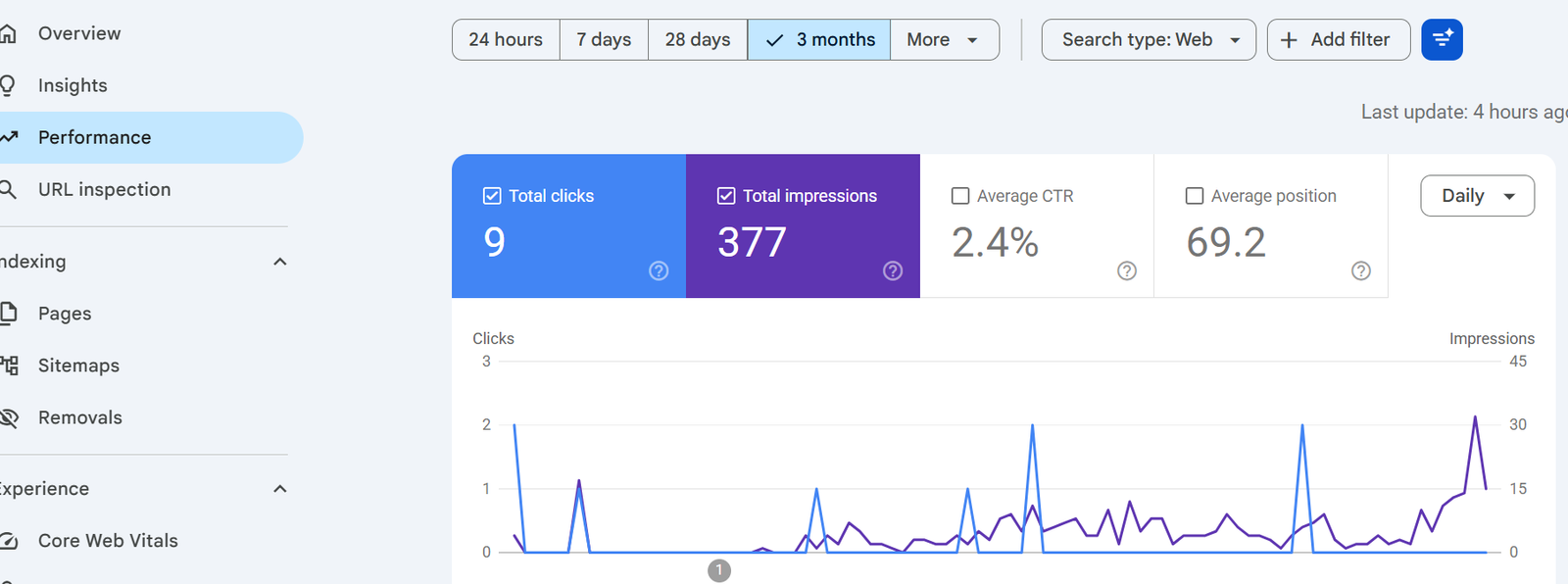
As a beginner, it’s better that you use one free SEO tool and it will be Google Search Console. It gives you a real-time insight into exactly how your website is doing in Google Search.
Search Console will allow you to view your prospective visitors, what keywords you are attracted to, which pages are being indexed with the most views, ranking positions, click throughs, indexing problems, mobile device indexing problems and general mobile device usability.
Rather than making assumptions about which marketing efforts are delivering results, you’re going to own real data to help make decisions and regularly reviewing your data is one of the top habits of any website owner.
Tip 18: Be Patient and Consistent
The most challenging things to understand in SEO is that it takes time to get seen. A great article can be published today, and get very low traffic for weeks. It doesn’t mean that all your work was wasted.
Google requires time to identify, assess and compare you to thousands of pages. Not all websites with the most money spent in working capital are the top success stories — they are actually the ones that continue to publish useful material, that works on existing articles, as well as those that learn from their data.
We have recently released a new online article, “Pro Tip: SEO Is a Marathon, Not a Sprint”. Rather than asking “Why isn’t this article ranking yet”, question yourself “How can I make this article, the very best on its subject? That’s so different a mentality.
Free SEO Tools for Beginners
A common belief is that you need expensive software to get started with SEO. You can practice good SEO with a number of free tools, though premium ones can save time as your site grows.
| Tool | Best For | Free Version |
|---|---|---|
| Google Search Console | Checking rankings, impressions, and indexing | Yes |
| Google Analytics 4 | Monitoring traffic and visitor behavior | Yes |
| Google Keyword Planner | Finding keyword ideas | Yes |
| Google Trends | Identifying topics people are searching for | Yes |
| Ahrefs Webmaster Tools | Monitoring and auditing backlinks | Yes |
| Bing Webmaster Tools | SEO suggestions based on Bing search data | Yes |
| Screaming Frog SEO Spider | Technical and content audits (up to 500 URLs free) | Yes |
You don’t need to use every tool at once. Google Search Console and Google Analytics are the best places to start, since together they give you the clearest overview of your site’s performance. Add keyword research, technical SEO, and backlink tools as your site grows.
Common SEO Mistakes to Avoid
Even experienced site owners make mistakes with SEO. What matters is catching them early so they don’t hold your website back.
Targeting Too Many Keywords on One Page
Each page should focus on one main topic. It’s not effective to target ten different keywords in a single article. Pick one main keyword and use related words naturally throughout.
Publishing Thin Content
A 500-word article that only briefly touches on a question struggles to compete with more thorough material. Ask yourself: does this article fully solve my reader’s problem? If not, keep working on it.
Ignoring Search Intent
An article can be well written and still fail to rank if it doesn’t match what searchers actually want. Check the first page of Google before writing any new post.
Keyword Stuffing
Repeating a keyword throughout a page used to help rankings. Now it often has the opposite effect. Write naturally. If a sentence reads like you crammed a keyword into it, rewrite that sentence.
Overlooking Internal Linking
Many people publish blog posts without linking them to other parts of their site. Link each new post to your existing pages wherever it makes sense. Internal links make it easier for visitors to navigate your site and help search engines find your pages.
Not Keeping Old Posts Updated
SEO isn’t something you do once and move on from. Update your key articles every few months by improving the content, updating examples and images, fixing links, and correcting anything outdated.
SEO Checklist for Beginners
Use this checklist before publishing your next article.
Planning
- Decide on your primary keyword
- Analyze the search intent behind it
- Find related keywords
- Read competing articles
Writing
- Give it an engaging title
- Write a helpful introduction
- Use headings
- Keep paragraphs short
- Use practical examples
- Address commonly asked questions
On-Page SEO
- Include the keyword organically
- Write a good meta description
- Optimize the URL
- Compress images
- Give images descriptive alt text
- Use internal links
- Insert a couple of external links
Technical SEO
- Make sure the page is mobile friendly
- Check its loading speed
- Enable HTTPS
- Index the page in Google Search Console
Post-Publishing
- Share it on social media
- Track impressions in Google Search Console
- Update the post regularly
Frequently Asked Questions
Is it difficult to learn SEO?
Not at all. The fundamentals are simple and can be learned by anyone willing to put in the work. Start with keyword research, provide valuable content, and get familiar with how search engines work. With more practice, the advanced topics become easier too.
How long does SEO take to work?
SEO is an ongoing process. Some pages earn impressions within a few weeks, while others need several months to rank well. Consistency and quality matter more than speed.
Can I teach myself SEO without taking a course?
Yes. There are many free resources and tools, such as Google Search Console, that can teach you a lot in practice. The key is learning by testing things out on your own website.
Is SEO free?
You can learn and start SEO without spending money. There are paid tools that help along the way, but plenty of successful websites start with free resources and only invest in paid tools later.
What is the optimal number of keywords to target per page?
Focus on one main keyword per page, and include related keywords in your subheadings. Avoid targeting too many unrelated keywords on one page, since it makes the content less focused and harder to rank.
Do backlinks still matter?
Yes, but quality matters more than quantity. A few links from trusted websites are worth more than many links from low-quality sites.
When should I update my content?
Review your key articles every three to six months. Keep content fresh and relevant by updating facts, improving examples, and fixing anything outdated.
Will AI-generated content rank on Google?
Google judges content on usefulness, originality, and value to readers, not on how it was produced. AI-assisted content that’s genuinely useful, well written, and shows real knowledge of the subject can perform well. Generic, non-original AI content generally does not hold up over time.
What is the most useful free SEO tool?
Google Search Console is the go-to tool for most beginners. It shows you which keywords are earning impressions, how your pages are ranking, and where you can improve.
What’s the most important SEO practice for a small business?
Be genuinely useful to the people you’re trying to reach. Everything else, keywords, titles, internal links, technical tweaks, works best on top of content that’s actually helpful and reliable.
Final Thoughts
SEO may seem daunting at the beginning but be aware that the people who are doing well in the internet are all beginners.
Don’t stress about going crazy and getting all of the ranking factors correct before writing your first article; you don’t have to use the most expensive software available to perform SEO. It is essential to know who you are and what they care about, make it useful and keep getting better as time goes on.
Practice solving practical problems. Gain an understanding of how individuals find information. Serve up articles that precisely and honestly reply their queries. Tools such as Google Search Console will give you relevant insights that would help you appeal to your website’s strategy making, you will not have to be speculative.
Quick wins are not in the cards with regard to SEO. It is about creating a website that is trusted and will draw the visitors back. Each quality article you create to publish makes it stronger.
Don’t be discouraged by lack of initial results: if the first few articles don’t rank well, work on them to bring up the rank. Continue the education, update content & be consistent. It’s the Web page pages that keep on improving over time that’ll find the success they are seeking.
Follow this guide to read the tips and follow them 1-by-1 and you’ll be on your way to a website that will obtain much more traffic and generate enduring presence in google search.

Hi, I’m Faraz, the creator of Monetigoo. I’m passionate about helping beginners learn how to make money online in simple and practical ways. Through my website, I share easy guides, real strategies, and useful tips that anyone can follow, even with no experience.
My goal is to make online earning understandable for everyone. I focus on methods like freelancing, blogging, and digital income ideas that actually work in today’s world. I believe anyone can build income online with the right mindset, consistency, and clear direction.
At Monetigoo, I aim to provide honest, helpful, and beginner-friendly content so you can start your own online earning journey with confidence.
4 thoughts on “Best SEO Tips for Beginners to Start Ranking Higher on Google”